Specific Build Numbers are made for Specific regions and you will get the update from which region you have bought the device. But Samsung does not want such thing, which leads to the origin of Odin,A flashing tool that allows Samsung users to Flash Official ROMs, Rooting Zips and CWM Recovery on it. The same tool also allows you to install other regions Firmwares on your device. XXANA2 Android 4.1.2 Jelly Bean is available for Galaxy S3 Mini. This Firmware can be installed manually like any other official firmware of samsung. You might have received the update via OTA or Samsung Kies, But if you haven’t received it yet, whether OTA or via Samsung Kies, then you can follow our tutorial to install This Firmware on your device.Thanks to SamMobile, for providing us the firmware File that we will use in our tutorial below. But there are chances of no extra language packs. As this is an official Firmware, you won’t be needing any Custom Recovery or rooted device to install this Firmware on your Device.

If you are familiar with Odin and it’s working, then this tutorial might not be difficult for you. Otherwise read the whole tutorial first before trying it on your device. In this Article, we will show you How To Update Galaxy S3 Mini To Android 4.1.2 Android Jelly Bean Official Firmware.But before we begin, I'll tell you what should you do before format your CM10 into factories settings.
there are 3 thing what should do to make sure it:
- That you have a Well Charged Battery.
- Back-Up all your important Contacts, Call Logs & Messages.It is highly recommended in case of any mishap or data loss to back up all your important data.
- Back-Up your Mobiles EFS Data. How To Restore and Back-Up EFS Data On Samsung Galaxy Devices.
Important things:.
- Enable USB debugging mode.
- Make sure that battery level is at 85% or more.
- This Tutorial is Only For Galaxy S3 Mini.
Root Warning:
and I'll tell you How To Install It.Since Android 4.2 XXANA2 is an official Release from Samsung and it doesn’t require Root or Custom Recovery. But if your Device is rooted, Installing this Firmware will most likely to erase the Root of your device. You need to root your device again to gain root access and start installing Custom Tweaks on it

- Download Android 4.1.2 I8190XXANA2 for Galaxy S3 Mini to your computer and extract the zip file.
- Download Odin.
- Turn off your Phone and Turn it On While Pressing, Power + Volume Down + Home button until you see some text on-screen, Press Volume Up to continue.
- Make Sure that the USB drivers are installed.
- Open Odin in Computer and connect your device to PC, while it is in the Download mode.
- If your Phone is successfully connected to PC, the Odin port will turn Yellow with COM port number.
- Now Click on PDA and select the File I8190XXANA2_I8190XXANA2_I8190XXANA2.md5, or the one who has the biggest size.
- In Odin, Check Auto reboot and F.Reset Options.
- Now Click the Start button and wait for the process to complete.
- After the installation is complete you device will restart and once you see the Home Screen, unplug the cable.
That’s it your Galaxy S3 Mini has been updated to Android 4.1.2 XXANA2 Jelly Bean Official Firmware. Go to Settings > About To verify.
If You’r Upgrading from a Custom ROM:
If you are upgrading from a Custom ROM, you will most likely to stuck into bootloop. If this situation occurs. do the following:
- Flash Custom Recovery like you did before and Go to Recovery. Turn off your Phone and Turn it On While Pressing, Power + Volume Up + Home button until you see some text on-screen,
- Navigate to Advance and Select Wipe Devlik Cache.
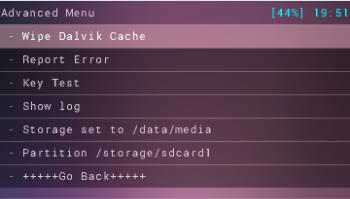
- Go Back and Select Wipe Cache.
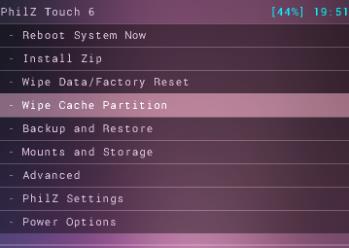
- Select Reboot System Now.


No comments:
Post a Comment