1. First of all extract/unzip the Odin folder on your desktop, and launch it by double clicking on the Odin3 v3.07.exe.
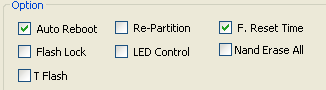
2. Now in the Odin3 screen, make sure to check the Auto Reboot and F.Reset Time options.
click "option" to see the picture
3. You need to Reboot your device into Download Mode, Here is how to do it;
- First of all Switch-off your Galaxy S3 Mini.
- Now Press and Hold the ‘Volume Down+Home+Power Buttons‘ at the same time, till you see the Warning Message on your screen.
- Now just hit the Volume Up, and you’re done.
4. While in the download mode, you can now connect your Galaxy S3 Mini to PC using the data cable.
5. Here make sure that Odin recognizes your device, the ID:COM port will be either turn Yellow or Blue and you’ll also see the Added! In the message section. (Just confirm that your device is recognized, if not then try changing the USB ports on your PC).
6. After everything is setup correctly, proceed to hit the PDA button and select the FirmwareUpdate file you’ve downloaded earlier and then hit the START button*.
7. It can take 4 to 5 minutes to Flash the Android 4.1.2 Jelly Bean Firmware Update on your Galaxy S3 Mini. Just wait for Odin3, once it is completed, Odin will notify using the green PASS message, and your Galaxy S3 Mini, will also automatically get rebooted.
8. After normal reboot you should have Android 4.1.2 Firmware running on your Galaxy S3 Mini (GT-I8190).
*note: If it's not work, remove your battery and press 'Volume Up+Home+Power Buttons' and go to Format cache. If it doesn't work to, do the same thing and format data.
That’s it folks, I tried my best, to make everything as simple as possible, and hoping that you’ve learned, Manually Update Galaxy S3 Mini to Official Android 4.1.2 Jelly Bean Firmware. If you find this tutorial useful, share it with your friends, who have got the device and let us know in the comment section, how everything went for you.


No comments:
Post a Comment